Toolpath Planning in MapleCAM
MapleCAM is a desktop CAM application I built for my LongMill CNC router. I wrote about the V-carving implementation previously.
I split toolpath generation into two stages: operations produce cutting geometry, and a central planner handles everything else. The planner also maintains a 3D voxel model of the stock, carving it as it goes, so transition decisions are based on what material has actually been removed. The result is 56% less machining time on a real project, almost entirely from smarter transitions between cuts.

The Problem
MapleCAM has over a dozen operation types: contour, pocket, engrave, V-carve, chamfer, facing, several laser modes, and more. Before this change, each operation was responsible for the full toolpath pipeline – computing the cutting geometry, ordering paths, choosing entry points, handling transitions, and adding retracts to safe height.
Every operation reimplemented the same logic slightly differently. Contour had its own path reordering. Engrave had its own path optimizer. The clearing strategies each independently managed transitions and safe-height logic. The clearing base alone was over 500 lines, and a large portion of that was transition handling that had nothing to do with clearing geometry.
The practical problem was that improving toolpath quality meant changing every operation. Better path ordering had to be implemented everywhere. A new transition strategy had to be implemented everywhere. Every improvement was multiplied by the number of operations, and every operation had its own slight variation of the same logic.
The V-carve optimizer I wrote previously was a good example. It produced excellent optimized geometry, but the code that turned that geometry into a toolpath – entry points, transitions, retracts – was bespoke V-carve code that couldn't benefit any other operation. The optimizer was reusable; the toolpath orchestration wasn't.
The Intermediate Format
The fix was to split toolpath generation at a clean boundary: operations produce what to cut, and a planner decides how to cut it. The intermediate format is that boundary.
The format has three types:
- Cutting line: an open polyline from first vertex to last. The tool cuts start to end – direction matters because it controls climb vs conventional milling. The planner never reverses a line.
- Cutting loop: a closed polygon where the last vertex connects back to the first. The planner may rotate the entry point – start cutting at a different vertex – but never reverses the winding direction, which controls climb vs conventional the same way line direction does.
- Cutting group: a collection of lines and loops. Groups are processed in emission order – all paths in group 1 are cut before any path in group 2. Within a group, the planner freely reorders paths.
All three types store per-vertex 3D coordinates. Z=0 is the stock surface, cutting depths are negative, and safe height is above the stock. This is what makes tabs and V-carving work in the intermediate format – a cutting loop for a contour with tabs has vertices that dip to cutting depth and rise to tab height, with the Z profile baked directly into the vertex positions. A V-carve cutting line has per-vertex Z from the medial axis depth calculation. The intermediate format doesn't need special tab or depth-profile types because the geometry carries that information in the vertices.
Lines and loops can also carry arc metadata per segment – each segment between consecutive vertices is either linear or an arc with a center point and direction. This lets the planner emit native arc moves (G2/G3) without losing the arc information through the pipeline.
Each group also carries the settings the planner needs: feed rates, entry strategy, tool identity for tool-change detection, and the tool's sweep profile for the voxel simulation. The sweep profile describes the tool's shape – tip radius, how the radius changes per millimeter of height, and corner rounding – so the planner can compute the tool's effective width at any cutting depth. Operations resolve these from their configuration and embed them in the groups, so the planner doesn't need to know anything about the operation that produced them.
Operations are responsible for:
- Computing the cutting geometry (offsets, clearing patterns, medial axes)
- Setting the direction of lines and winding of loops
- Setting per-vertex Z (for tabs, V-carve depth profiles, helical descent)
- Grouping paths to control ordering
Operations are not responsible for:
- Choosing entry points or entry strategies
- Handling transitions between paths
- Ordering paths within a group
- Simulating the stock
Different operations use different grouping strategies, and the grouping is where operations express their ordering constraints:
- Contour: one group per depth per region. All passes at -5mm are cut before -10mm.
- Engrave: one group per depth containing all paths. All edge and island paths at the same depth are freely reordered.
- Clearing: two groups per depth – contour loops first, then clearing paths. Clean walls before bulk removal at each level.
- V-carve: one group per medial axis branch. Each branch is its own group because transitions between branches at V-bit depth would sweep a wide arc near shape edges.
The Planner
The planner takes a list of cutting groups and produces a final toolpath. It's the single piece of code that replaced the per-operation toolpath logic – path ordering, entry point selection, transitions, and retracts all happen here.
Path Ordering
Within each group, the planner orders paths by nearest-neighbor. It tracks the tool's current position and picks the closest uncut path as the next one. For loops, distance is measured to the closest vertex, since the planner can enter a loop at any point. For lines, distance is measured to the closest point on the line – not just the start vertex.
If the closest point on a line is in the middle, the planner splits the line there. The half whose start is nearer is emitted first; the other half goes back into the pool for future nearest-neighbor selection. Both halves preserve the original cutting direction – lines are never reversed. The split is only done when the closest point is meaningfully closer than the start and isn't too close to either end, to avoid degenerate tiny sub-lines.
The planner tracks where the tool exits each path, which feeds into the next nearest-neighbor pick. A line exits at its last vertex. A loop exits at its entry vertex – the tool traverses the full loop and returns to where it started.
Entry Point Selection
Loops enter at the closest vertex at the deepest Z on the loop. This matters for tabs: if a loop has vertices at cutting depth and tab height, entering at a deep vertex means the closing move – the last segment back to the entry point – travels along the bottom of the cut. Entering at a tab vertex would mean the closing move crosses a tab transition, which can leave witness marks. If a point between vertices is meaningfully closer than any vertex, the planner can split the loop there and enter at the split point.
Lines enter at the start vertex after any splitting done during path ordering. Direction is set by the operation and the planner respects it.
Transitions
When the planner moves from one path to the next, it has two options:
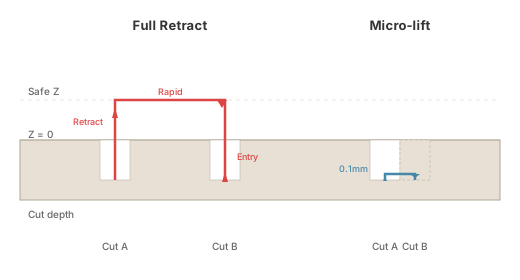
- Full retract: lift to safe height, rapid to the next entry point, descend to the stock surface, and execute an entry strategy. The entry strategy handles the move from the stock surface down to cutting depth – a simple plunge, a ramp along the cutting path, or a back-and-forth slot, depending on the operation's configuration.
- Micro-lift: small lift (0.1mm default), traverse to the next path, drop back to cutting depth. Used when paths are close enough within the same group. The planner validates the traverse against the voxel model before committing – details in the voxel-gated transitions section below.
When the previous path was a closed loop, the planner can optionally follow the loop's groove while lifted, walking along the already-cut path to get closer to the next entry point before traversing across. This reduces the unsupported traverse distance and makes more micro-lifts viable.
If it's the first path in a group, or the voxel model says the traverse is unsafe – full retract. If the traverse is safe – micro-lift. The tool width used for these decisions is depth-aware: a V-bit's threshold width at -5mm is wider than at -2mm, because the tool is physically wider at that depth.
Entry Strategies
Entry strategies are pluggable. A plunge entry drops straight down. A ramp entry descends gradually along the cutting path – useful for harder materials where plunging risks tool breakage. The planner provides the entry position, target depth, and path geometry, and the strategy handles the rest.
Simulating the Stock
The planner maintains a 3D voxel model of the stock. Every cutting move carves the model – after each segment, the voxels the tool swept through are marked as empty. The planner always has an accurate picture of what material remains, and makes decisions based on actual state rather than heuristics.
The voxel model uses a sparse octree. Space is divided into chunks, and only chunks that have been written to consume memory. Chunks that are entirely one state – all material, or all empty – require no per-voxel storage. At typical machining resolutions (0.1mm per voxel), a large workpiece would be impractical to store as a dense 3D array, but the sparse representation keeps memory proportional to the boundary geometry – fully solid and fully empty regions are equally compact.
The simulation knows the shape of the tool, not just its nominal diameter. A flat endmill sweeps a cylinder. A V-bit sweeps a cone – wider at depth, tapering to a point. A ball endmill sweeps a hemisphere. The tool's radial profile describes how the cutting radius varies with height from the tip, and the simulation uses that profile when carving each segment. A V-bit at -5mm depth carves correctly wider than the same tool at -2mm.
Swept volume computation is analytical per cutting move – the simulation fills the full tool-swept volume along each line or arc segment in one operation, not by stamping individual circles at discrete positions along the path. This is both faster and more accurate.
Voxel-Gated Transitions
The voxel simulation changed how micro-lift decisions work. The old approach used a simple distance threshold – if the next path was within one tool width, it was assumed safe to traverse. That was often wrong. Paths could be close in XY but separated by uncut material, and traversing through it would gouge the stock.
Now the planner checks the actual voxel model before committing to a micro-lift. It sweeps the tool along the proposed traverse path at the lifted height and checks whether any voxel in that swept volume contains material that isn't marked as cuttable by the current operation. Material that has been marked as part of the operation's cutting region is safe to traverse through – it's material the tool is allowed to cut. Only unmarked material (outside any operation's cutting region) blocks the traverse.
This has two effects. First, it eliminates false positives – micro-lifts that looked safe by distance but would have gouged material outside the cutting region. Second, it enables micro-lifts that the distance threshold would have rejected. Paths that are farther apart than one tool width can still be reached by micro-lift if the material between them is within the operation's cutting region. The voxel model knows; the distance threshold didn't.
For variable-width tools like V-bits, the traverse check uses the tool's full shape – the same cone profile used for carving – so the swept volume accounts for the V-bit's width varying with height.
Engagement and Feed Rates
The voxel model also enables per-segment feed rate adjustment based on how much of the tool is engaged in material.
Radial engagement is the fraction of the tool's circumference in contact with material at a cutting position. Slotting – cutting a full-width channel – is full engagement. A light finishing pass along an edge might be 0.1 or less. Air cuts are zero. The ideal feed rate depends on engagement: less material contact means the tool can move faster while maintaining the same chip load.
The planner samples the voxel model around the tool perimeter at each cutting position – dozens of points around the circumference – and measures the longest continuous arc of contact with material. That arc maps to a radial engagement fraction. If an operation specifies a target engagement, the planner scales the feed rate to maintain consistent chip load: lower engagement gets a higher feed rate, higher engagement gets a lower one. The scaling is clamped – never faster than the base rate, never slower than 25%.
Because the voxel model is carved as the planner goes, engagement readings reflect material already removed by earlier passes. A second pass over the same area sees less material and gets a higher feed rate automatically.
Unified Planning
The planner runs once across all operations in the project, not once per operation.
The old per-operation model had each operation planning its toolpath starting from the origin. The first cut in an operation might be right next to the last cut of the previous operation, or it might be 300mm away – but each operation planned independently and had no way to know. The tool would retract to safe height, rapid back toward the origin, and start over.
With unified planning, all operations contribute their cutting groups to a single planner invocation. The planner processes groups in order, tracks the tool's position across operation boundaries, and applies the same nearest-neighbor ordering and transition logic everywhere. If the last cut of one operation is next to the first cut of the next, the planner handles the transition directly instead of retracting and starting fresh.
Each group carries its own settings, so the planner handles changes in tool, feed rates, and entry strategy at group boundaries without needing to know anything about the operations that produced them.
Results
The test case is a patterned pocket – a repeating decorative pattern cut with a 6mm endmill at -1mm and -2mm in 1mm passes. Same project file for both runs; only the toolpath generation code changed.
| Metric | Before | After | Change |
|---|---|---|---|
| Total distance | 217.6m | 68.0m | -69% |
| Rapid distance | 162.5m | 19.9m | -88% |
| Cutting distance | 55.1m | 48.2m | -13% |
| Full retracts | 1,580 | 1,091 | -31% |
| Micro-lifts | 726 | 1,213 | +67% |
| Time in transitions | 47.5 min | 11.6 min | -76% |
| Estimated total time | 87 min | 38 min | -56% |
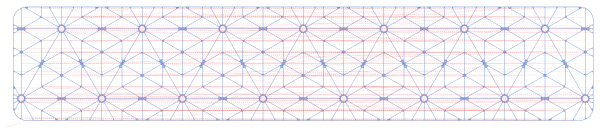
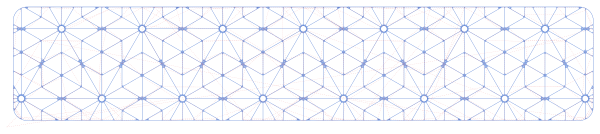
The cutting distance barely changed – the tool still removes the same material. What changed is how the tool moves between cuts.
Blue is cutting, dashed red is rapid traversal:
Where the Time Went
The old toolpath spent 47.5 minutes – more than half the total job time – on transitions. Each full retract averaged 1.8 seconds: lift to safe height, rapid an average of 64mm, descend to the stock surface, execute the entry strategy to cutting depth. With 1,580 of those, the transition time alone was longer than the entire new toolpath.
The new toolpath spends 11.6 minutes on transitions. The total number of transitions is similar (~2,300 in both cases) but their character changed. 489 full retracts became micro-lifts – the paths were close enough after reordering that the tool could traverse with a small lift instead of retracting to safe height. The micro-lift count went from 726 to 1,213. The remaining retracts got shorter – average rapid distance dropped from 64mm to 12mm, and average retract time dropped from 1.8 seconds to 0.6 seconds.
The rapid distance reduction from 162m to 20m follows from this. The remaining 20m is mostly transitions between groups – moving from one depth level to the next, or from a contour pass to a clearing pass. These are retracts to safe height that can't be avoided because the group boundary enforces the ordering constraint.
Real CNC machines spend time accelerating and decelerating on every direction change. Each retract cycle involves at least four direction changes. Fewer retracts means fewer acceleration penalties, which accounts for additional time savings beyond what constant-velocity estimates predict.
On a hobby CNC like the LongMill, 49 minutes saved on a single part is significant. The pattern repeats across the workpiece, so longer jobs with more repetition would see even larger absolute savings.
These improvements apply to every operation type. Contour operations benefit from entering loops at the closest point instead of a fixed start. Engrave operations with hundreds of paths benefit from nearest-neighbor ordering across all paths at each depth. V-carve operations benefit from voxel-aware transitions that account for tool width at depth. The planner is one piece of code, and every improvement to it improves every operation.