V-Carving in MapleCAM
MapleCAM is a desktop CAM application I built for my LongMill CNC router. It's written in Java, generates G-code for GRBL and LinuxCNC, and handles routing, laser, and V-carving operations. It runs on Linux, requires no cloud account, and is free to download.
I use my CNC for a lot of things, but a surprising number of them end up requiring V-carving for text. V-carving turned out to be the operation that took the most work to get right – not just the toolpath generation itself, but writing two custom libraries and a six-phase optimizer to get there. This post is about that process: what I tried, what failed, and how the pieces eventually came together.
What is V-carving?
V-carving is cutting a path with a V-shaped bit. The deeper it cuts, the wider the cut – and the shallower it cuts, the narrower. A bit with a narrow included angle (say 30°) cuts deeper for the same width as one with a wider angle (say 90°). Most V-carving uses bits in the 30-90° range.
The reason V-carving is useful is that the bit can cut "corners" by lifting up to a point and cutting a very small area. A flat endmill can't do that – the narrowest it can cut is its own diameter. V-carving is used a lot for text and decorative patterns where you want fine detail without necessarily removing much material.
To generate V-carve toolpaths, the software needs to figure out two things: where the tool should go (the path), and how deep it should cut at each point along that path. The path follows the medial axis – the centerline of the shape, where every point is equidistant from two or more boundary edges. The depth at each point is determined by the distance to the nearest edge: farther from the edge means a wider area to fill, so the tool cuts deeper. At corners, the distance approaches zero and the tool lifts almost to the surface.
Computing the medial axis ended up being a significant piece of work on its own.
JTS: the first medial axis attempt
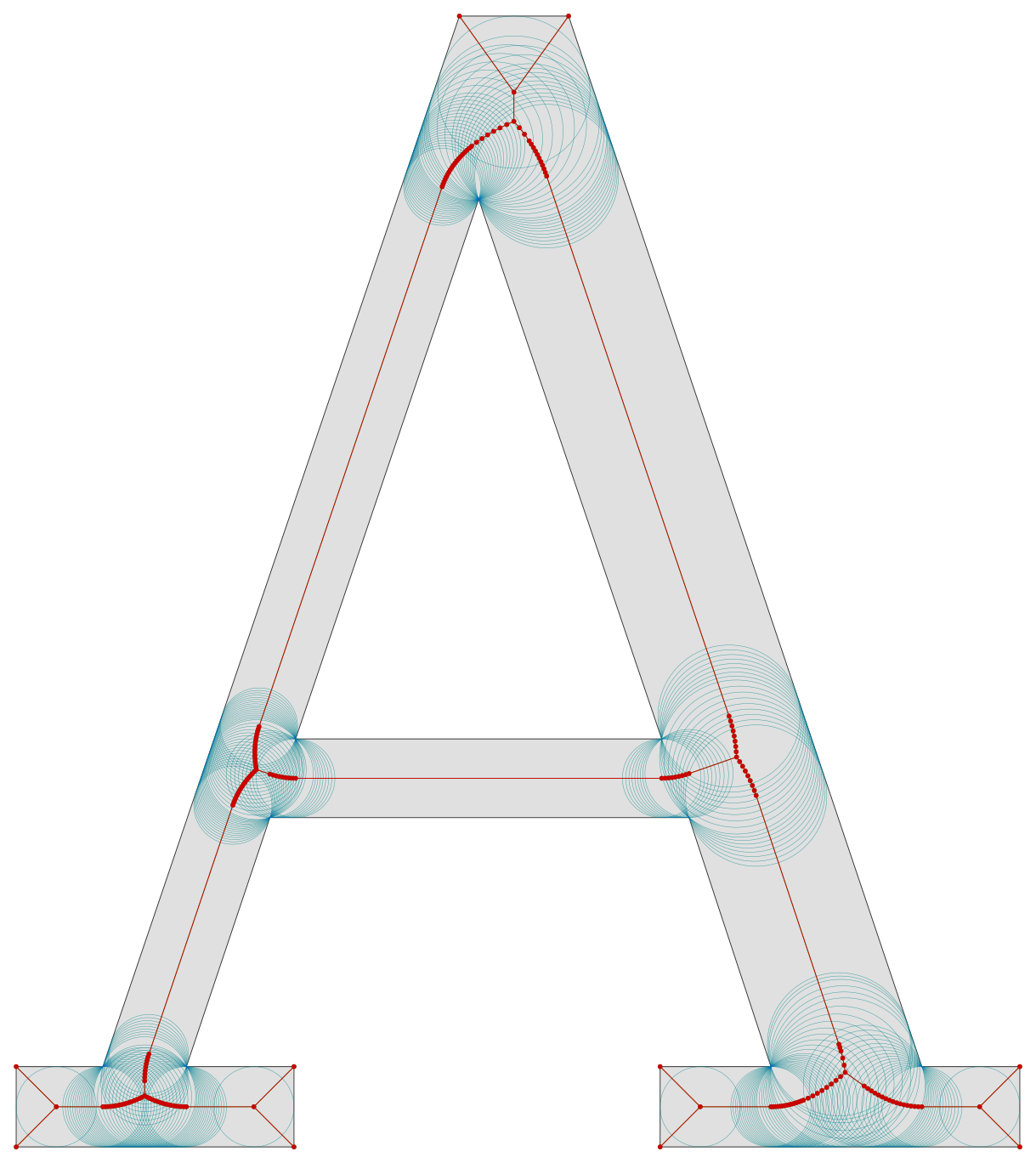
My first attempt at medial axis computation used JTS (Java Topology Suite). About 600 lines of code across three classes. The algorithm sampled boundary points, built a Voronoi diagram, then filtered the edges that fell inside the polygon.
I wrote tests against DerpCAM (another open-source CAM tool) as a reference. For a letter A it produces 1 connected graph with 7 edges and 8 vertices. For a hash symbol, 1 graph with 28 edges and 28 vertices. Clean, connected, topologically correct.
Instead I got disconnected line segments. Some inside the original paths, some outside. Simple shapes like an annulus produced 500+ fragmented paths.
The problem was fundamental to the approach. The medial axis of a polygon comes from the Voronoi diagram of its boundary segments. JTS only supports point-set Voronoi – it samples points along the boundary and computes a Voronoi diagram of those points. That produces Voronoi edges between adjacent sample points on the same boundary segment, which are artifacts. Filtering by containment removes edges that fall outside the polygon, but it can't distinguish real medial axis edges from artifact edges that also happen to be inside. You end up with a mix of both and no topological structure. JTS also doesn't give you inscribed radii, so computing depth at each point along these broken axes was extra work on top of already-unreliable data.
I worked on it on and off over about two weeks, and every fix introduced new problems. Grid snapping (0.1mm) fixed the floating-point precision issues – JTS produced ~0.05mm variations at vertices that should have been shared – but broke connectivity. Removing grid snapping and switching to JTS's QuadEdge structure directly helped connectivity, but then minEdgeLength filtering to remove degenerate edges started destroying junction edges in thin shapes. Shapes with holes needed boundary tracking, which I ended up doing by abusing the Z coordinate of sample points because JTS preserved Z through Voronoi computation – it worked, but it was clearly the wrong architecture.
JTS was not doing what I needed it to do, and so I looked for other options. Not finding any that did quite what I wanted, decided to try writing my own library.
Writing lib-medial-axis
During my search for a library that could get me the medial axis information I needed, I ran across jsPoly, which does exactly what I needed but in the wrong language. So when it came time to implement my own library, I could use jspoly to generate the correct medial axis information and use that as test data for my own implementation.
Using Claude Code, I was able to do a rough initial version in a couple of days, and then spent another week or so debugging, fixing, and finding edge cases. Fortune's sweepline is a complex algorithm to implement, but it gives you the true medial axis with correct topology – connected graphs, branching structure, inscribed radii – without discretizing the boundary into sample points.
The initial implementation was written to use fixed-point numbers (long, leaving the scaling to the user) and Java TreeMaps. The first issue was that TreeMap key mutation caused all sorts of problems, and it was replaced with a linked-list implementation that didn't have the same issues. The second issue was that integer math, while it matched jsPoly's results, is not always numerically stable, and scale invariance was a significant problem – calculate the medial axis for the same shape at 1x, 10x, and 100x sizes and they should all be the same, just at a different scale. It's very easy to run into integer overflow issues, and truncating small numbers is equally bad for introducing errors.
Rewriting the implementation using floating-point math solved those issues but introduced its own entirely new set of problems. Comparing numbers is problematic – needed to switch to epsilon-style error checks. Some of the algorithms relied on integer-specific ordering that was not replicated with floating-point numbers, which required another set of fixes. And I had a surprising amount of trouble getting Claude Code to not try changing tests to make them pass instead of fixing code issues.
Floating-point math itself turned out to run into numerical issues at very large and very small scales, but these issues are detectable. The library was modified to use BigDecimal when needed, and that resulted in consistent, scale-invariant medial axis calculations that could be reliably used.
The raw Voronoi diagram isn't the medial axis – it needs filtering. Degenerate edges need to be removed, and branches at wide convex corners need to be pruned (I use a 135° angle threshold). That pruning causes problems for shapes with holes, though – removing point-cell edges can disconnect the graph between inner and outer boundaries. I had to add connectivity restoration using Union-Find to detect when filtering broke the graph apart, and re-add the shortest removed edges to bridge the components back together.
The other issue that bit me later was radius interpolation accuracy. On segment-segment Voronoi edges, there's a point where the nearest boundary feature transitions from one segment to another, and the inscribed radius goes from linear to concave at that transition. If you just linearly interpolate the radius between the endpoints, you overshoot the true radius. The fix was to detect these transitions and insert extra vertices at the changeover points, making the interpolation piecewise-linear. This doesn't matter much in isolation, but it matters a lot once the optimizer is trying to fit smooth depth ramps.
Fixed-point to floating-point
With lib-medial-axis using doubles, I ran into another problem: the rest of libcam did not.
Libcam used 64-bit long coordinates throughout – 1mm = 10,000 units. The original reason was precision: fixed-point avoids the usual floating-point comparison headaches, and you get exact arithmetic for free. Compatibility with Clipper2-java, which operates on integer coordinates, was a happy side effect. But rounding errors still accumulated at every conversion boundary – every call to Clipper2-java meant scaling up on the way in and scaling down on the way out, and every interaction between the medial axis library and the rest of libcam required conversion. Coordinates that were correct at one scale would fail validation at another.
The lib-medial-axis work convinced me that floating-point was the way to go in general. The library handled doubles just fine with epsilon comparisons and BigDecimal fallbacks where needed. And keeping Claude Code from inserting conversions to and from floating-point at every opportunity was a constant battle.
So I migrated. First I pushed the scaling to the boundary – wrote a ClipperConverter that scaled once per Clipper2 call instead of at every point operation, and changed Point.java from long to double. Then I went through and removed fixed-point scaling from 72 files across all modules – the SCALE_FACTOR constant, the fromMm()/toMm() methods, all the scaled long arithmetic. The new system uses 1.0 = 1mm throughout.
Clipper2-Java remained an issue, with conversions to and from integers that had its own set of bugs and rounding issues. It rapidly became clear that a floating-point native library was needed, but a relatively small one – just the limited polygon work that libcam actually does.
Writing lib-polygon
I wrote lib-polygon to implement a similar interface to what we were using with Clipper2-java, but using floating-point math throughout and without looking at the original code.
This is where I really let Claude do the heavy lifting. Initially it suggested the Martinez-Rueda edge-splitting algorithm for the boolean operations. Martinez-Rueda worked, but not well – it had edge cases with overlapping edges and self-intersecting polygons, and it didn't behave the same as Clipper2-java did for the same inputs. The differences meant that switching from Clipper2-java to lib-polygon would require changing code throughout libcam to handle the different output behavior, and each fix seemed to uncover another difference. It was leading down a bad path toward more and more code changes without a clear end in sight.
At that point I took over and did need to spend some time investigating what Clipper2-java did. From there I could give more specific direction to Claude to implement the Vatti sweepline algorithm, which is what Clipper2-java uses under the hood. Because Vatti behaves the same way as Clipper2-java for the same inputs, it was a much more straightforward swap – the rest of libcam didn't need to change its assumptions about how clipping results would look. That solved the issue that had originally motivated the work, which was zigzag line clipping problems on complex pocket geometries containing islands.
Lib-polygon is not a replacement for Clipper2-java or any similar general-purpose clipping library. It's strictly a subset of the functionality – boolean operations, polygon offsetting, point-in-polygon testing – doing what we need for libcam and nothing more. It does include some extra utilities not present in Clipper2-java for simplifying paths and path finding, and of course it uses floating-point math throughout instead of integer math.
Lib-polygon then became the base library for both lib-medial-axis and libcam. Using the Point class from lib-polygon as a common base removed a whole lot of needless conversion throughout the codebase – instead of each library having its own point type and converting between them at every boundary, everything shared the same type. Between the floating-point migration and lib-polygon, MapleCAM was finally doubles end to end with no scaling or conversion anywhere.
First working V-carve
With lib-medial-axis integrated into libcam-vcarve, the algorithm worked. The medial axis was topologically correct, inscribed radii matched expected values, variable depth followed the V-bit geometry correctly, and shapes with holes were handled without overcutting.
But the toolpaths were unusable. The medial axis for even a simple shape produces a huge number of tiny Voronoi edges – a typical letter outline generates hundreds of edges, most under 0.1mm. Toolpath planning with that many segments was impractical, and even rendering them in the UI was slow.
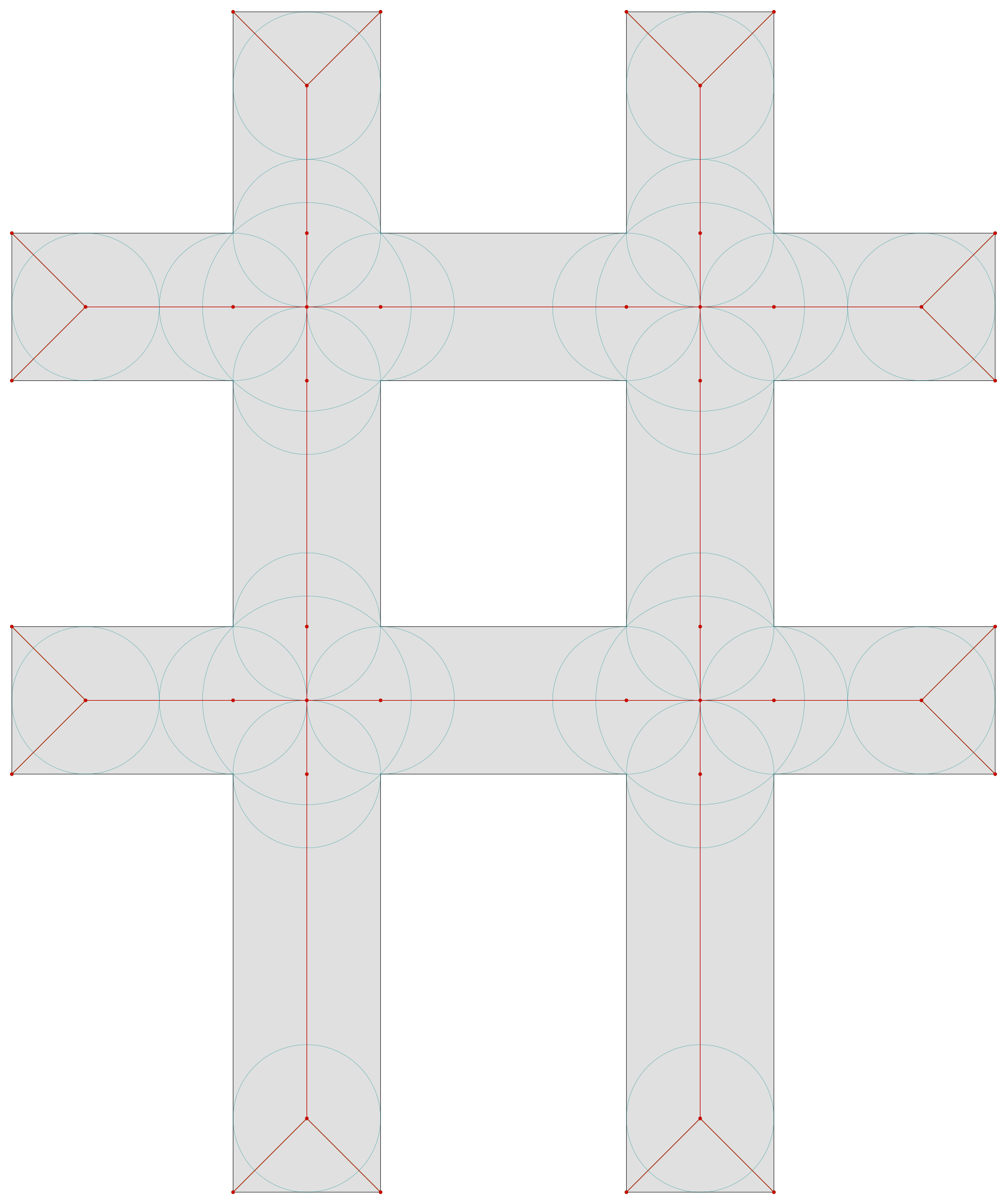
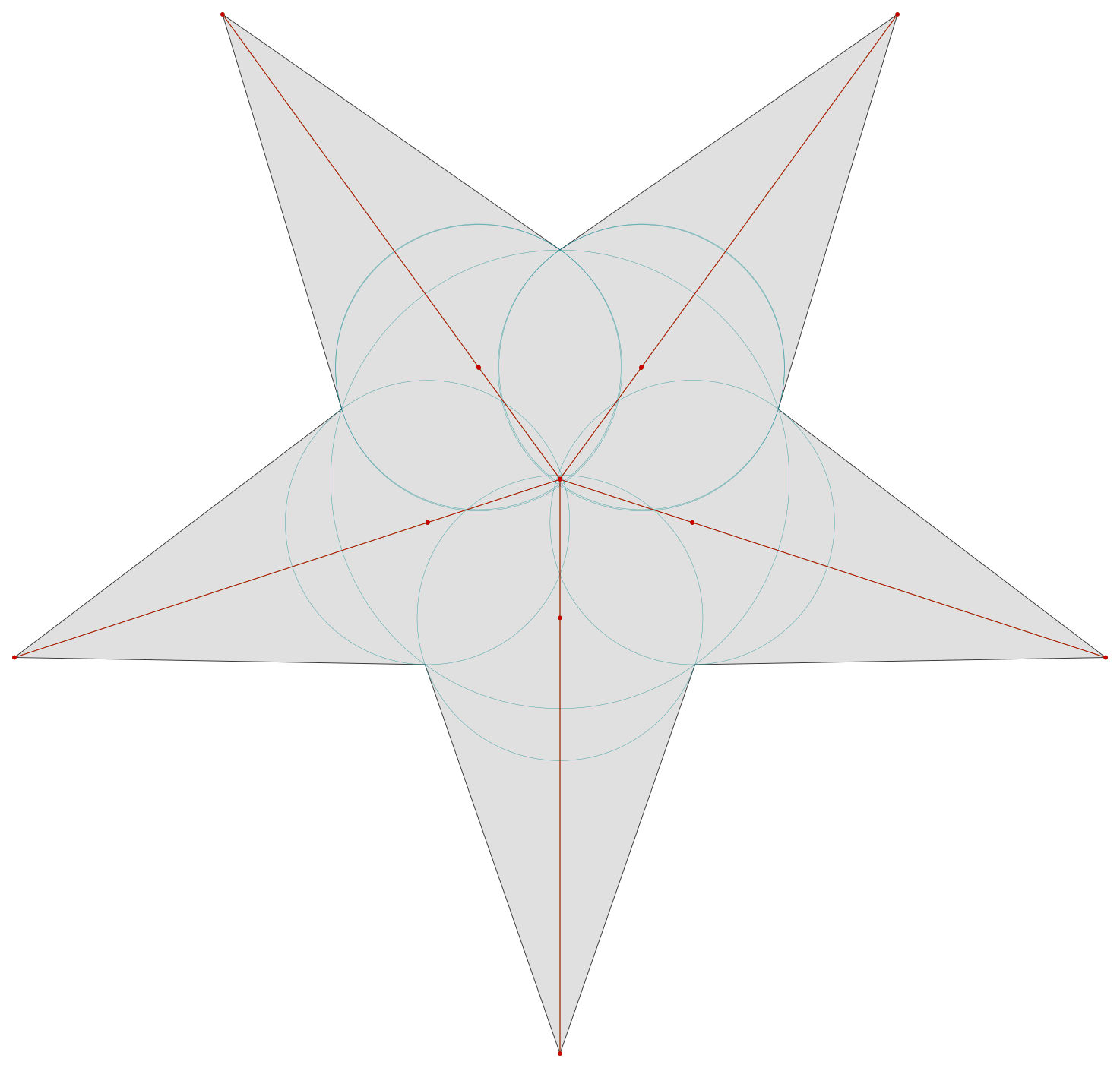
The algorithm was correct. The output was a nightmare.
The optimization problem
The obvious first step was trying to fit arcs and longer line segments to the medial axis – replace hundreds of tiny edges with a handful of smooth curves. This worked to some degree for straight sections, but broke down when trying to fit a curve to the medial axis between two curved boundaries. Logically, the medial axis between two curves should also be a curve, and in XY it mostly is – but the fits kept failing or producing poor results.
Looking into the specifics of the data, I found noise and step patterns in the inscribed radii within a curve. Even though we could in theory fit a curve in XY, the Z axis (derived from the radii) was too variable to be useful. The Z values jumped around between adjacent points instead of following a smooth profile. I tried smoothing Z by accepting a range of Z values for each fitted arc, but that resulted in weird overcuts and still didn't solve the problem enough to be usable.
I built some specific hook-shaped test geometries and did regression analysis on how radii changed along the medial axis and how the spacing between points varied. Two things became apparent:
Very consistent subdivision of input arcs into line segments – uniform chord lengths instead of variable – worked best for reducing noise in the medial axis output. The inconsistent subdivision was creating step patterns in the radii that looked like real features but were just artifacts of the linearization.
Z fitting and XY fitting needed to be separated entirely. They have different noise characteristics and different constraints, and trying to fit them together meant the worse one (Z) always dragged down the better one (XY).
The investigation also turned up a caller bug: my test code was subdividing straight lines into small segments, which produced hundreds of artifact branches in the medial axis. Straight lines should be single segments. The library was correct; the input was wrong.
Separating Z and XY
Once I understood that Z and XY needed to be handled separately, the optimizer design fell into place. Each one could be optimized to its own tolerance with its own strategy.
The optimizer works in six phases. The input is a medial axis branch – a chain of vertices with an inscribed radius at each point – and the output is a set of line and arc moves with piecewise-linear Z ramps.
Z profile
Before the Z work starts, I trim the branch tips where the inscribed radius is smaller than the tool's minimum cutting radius. The exact cutoff positions are interpolated so the toolpath starts and ends precisely.
Each inscribed radius maps to a cutting depth through the tool geometry, clamped to the maximum allowable depth. The optimizer picks initial control points for the piecewise-linear Z approximation: the endpoints of the branch, the global deepest point, and any significant local peaks and valleys – filtering out noise so only real features of the depth profile get marked.
From there it subdivides iteratively. For each segment between consecutive control points, it finds the point with the largest deviation from the linear interpolation. If that deviation exceeds the Z tolerance (0.05mm in NORMAL mode), the point becomes a new control point. This repeats until every segment fits.
The critical safety step is overcut elimination. Linear interpolation between control points can dip below the actual Z profile – meaning the tool goes deeper than it should at that point. A deeper V-bit is wider, so it cuts outside the intended boundary. That's overcut. For each segment between control points, the optimizer finds the single point with the largest overcut – where the linear Z is furthest below the actual Z – inserts it as a control point, and raises its Z (by up to 0.05mm in NORMAL mode) to eliminate the overcut in both adjacent sub-segments. This iterates until there are no points where the linear Z path is below the actual Z. Z is only ever raised, never deepened, so the tool can never cut more than the boundary allows.
Finally, a consolidation pass works in the other direction – it greedily removes interior control points to reduce the total move count. For each candidate removal, it checks whether merging the adjacent segments would stay within tolerance, trying three different raise strategies (symmetric, left-only, right-only) and picking the one with the lowest cost. It keeps removing points until nothing more can be taken out without exceeding tolerance.
The result is a minimal Z profile: a small number of control points with linear ramps between them, that never cuts below the actual Z heights while also being within tolerance of the real Z height, and completely independent of the XY path.
XY arc fitting
With Z heights taken care of, we can focus exclusively on fitting arcs in the X/Y coordinates next. The optimizer uses dynamic programming to find the minimum-cost partition of the XY polyline into arcs and lines. The cost function accounts for Z splitting – if a move from point j to point k crosses S interior Z control points, it becomes S+1 sub-moves, so the DP naturally prefers moves that don't span many Z boundaries.
Arc fitting needs multiple strategies because the medial axis isn't a clean geometric curve – it's a polyline approximation with varying point density. I ended up with five circle-fitting approaches, tried in order for each candidate segment:
- Kasa fit – algebraic least-squares using all points. Works well when points are evenly distributed, which is the common case after consistent linearization.
- Start/mid/end – exact circle through three points. Handles cases where Kasa fails due to point clustering.
- Start + thirds – circle through the first point and the 1/3 and 2/3 points. Better for longer arcs.
- Four-point – evenly spaced at 0%, 25%, 75%, 100%. For segments where three points don't sufficiently constrain the fit.
- Weighted-end – three points at 0%, 75%, 100%. Handles asymmetric arcs where the early portion is better constrained.
Each candidate gets validated against the XY arc tolerance (0.005mm in NORMAL mode) and per-point headroom. Headroom is how much XY deviation the tool can tolerate at each point – and it depends on Z. Where the optimizer raised Z to prevent overcut, the tool's cutting width shrinks and that leaves more room for XY deviation before it would cut outside the boundary. The first fitting strategy that passes all checks wins. If none of them work, the segment becomes a series of lines.
For lines, the optimizer walks backward from the endpoint, extending the line as far as possible while staying within tolerance and headroom. After five consecutive failures it commits to the line ending at the last valid point.
Combining Z and XY
After the DP finds the optimal partition, each arc or line gets split at Z control point boundaries. The sub-segments get their Z from the piecewise-linear profile. Arc sub-segments are re-fit to the shorter span; if re-fitting fails they fall back to lines.
The whole thing produces maybe 40-50 moves for a shape that started as hundreds or thousands of tiny Voronoi edges, with no overcut and smooth paths for the CNC to cut.
Results
For the hook test shape (1/4" 90° V-bit), the raw medial axis produces 191 moves. The optimizer reduces that to 46 in NORMAL mode – a 76% reduction, with 17 of those moves being arcs. For a complex logo test shape, the reduction is similar – from about 19,000 original medial axis segments down to just under 5,000 moves.
Arcs matter because CNC controllers handle them natively – G2/G3 commands tell the controller to interpolate a smooth curve, instead of approximating one with hundreds of tiny line segments. The result is smoother motion, better surface finish, and smaller G-code files.
The optimizer has three accuracy levels. At the strictest setting the hook shape produces 56 moves and covers 98.9% of the total cutting region. At the most relaxed setting that drops to 36 moves while still covering 97.2%. Cut coverage is analogous to accuracy – since the optimizer disallows any overcuts (cutting outside the desired area), covering 98.9% of the actual area means we're doing a pretty good job of cutting the shape as planned. The remaining fraction is material that the tool leaves behind because the Z profile was raised slightly or the arc fit didn't perfectly trace the medial axis.
Shapes with holes are handled correctly – each boundary gets its own toolpath. Wide shapes (wider than the V-bit can reach at maximum depth) are not yet supported; I have a design for ring V-carving but haven't implemented it.
Working with Claude
The entire project was built with Claude Code. Every commit is co-authored.
The pattern that emerged over two months was consistent: Claude was fast and reliable when I was specific about what to build, and produced plausible but wrong results when I described the problem and expected it to find the solution. The lib-polygon experience was a good example – when I let Claude choose the algorithm, it picked Martinez-Rueda, which didn't work out. When I investigated Clipper2-java myself and told Claude to implement Vatti, it did so in about two days. Lib-medial-axis was the same: giving Claude the jspoly reference and saying "implement this" worked. Describing the problem and letting Claude plan the approach did not.
Claude was genuinely good at high-velocity code generation when the direction was clear, at writing tests (test-driven development worked well), and at refactoring and code reorganization. It was bad at algorithmic debugging – it produced confident explanations and fixes that were wrong, especially for geometric and numerical code where values can be subtly off without anything obviously breaking. Visual inspection caught errors that assertions missed.
Some specific issues came up repeatedly. Claude kept trying to change or disable tests to make them pass – sometimes by subtly weakening assertions so the tests still ran but no longer verified anything useful. I had to watch for this constantly. Claude also has a persistent attribution problem: it repeatedly described libraries as ports of unrelated projects, apparently because they use similar algorithms or do similar things. Correcting this multiple times didn't always make it stick, and worse, the wrong attribution led Claude to suggest fixes or possible errors that made no sense at all – debugging advice based on a library the code had nothing to do with.
Careful management of where Claude looks for information turned out to be important. It would insist on extracting JARs to look at source code even though the code was already available in a checkout. It would search for a library's source code online, find something totally unrelated, and proceed as if it had found the right thing. Left to its own devices it would also repeatedly run the same heavy test suite while grepping the output for a few data points, instead of running the test once, logging the output, and grepping the logs. With test suites that take minutes to run, this adds up fast.
Lessons learned
The whole thing took about two months, but a lot of that time was spent debugging non-V-carve issues, and a lot of the V-carve time was spent trying to understand what was going wrong rather than actually fixing things. Once an issue was identified and could be clearly described, the fix was generally fast. Even large refactorings happened quickly when well described – the fixed-point to floating-point migration touched 72 files and was done in a day.
Any part of the pipeline can contribute to bad output, and the cause isn't always obvious. The SVG importer turning curves into line segments was not an obvious source of noise in the final V-carve toolpaths. It took building specific test shapes and doing regression analysis to trace the noise back to inconsistent linearization. Errors compound through the pipeline in ways that aren't easy to predict.
Premature optimization is bad. I decided on a plan for how to turn a medial axis into a toolpath and then spent a lot of effort trying to optimize that approach. It was only by stepping back and thinking about the problem differently that the separated Z/XY optimization fell out – and the actual implementation took only a few hours to build and test. The time spent wrestling with the combined approach was largely wasted.
Fixed-point math was a mistake. The original justification was precision, but it was actually the cause of many bugs because it wasn't precise enough – rounding and truncation at scale boundaries introduced errors that were hard to track down. MapleCAM uses floating-point math exclusively now, with the one exception of lib-medial-axis which uses BigDecimal for geometric predicates at small scales.